Save Your LinkedIn Profile as a PDF in Under 2 Minutes (2026)
Save, download or export your LinkedIn profile as a PDF, desktop or mobile, with screenshots. Then turn that PDF into an ATS-ready resume for free.

How does your LinkedIn resume score on ATS?
You've just exported your LinkedIn PDF. See how it scores against a real job in seconds: your ATS score, missing keywords, and concrete tips. Free, no signup.
Already have your LinkedIn PDF?
Check your ATS score and build a tailored resume in minutes (free) →
Last updated: August 2026
Exporting your LinkedIn profile as a PDF takes less than two minutes. The tricky part is finding the right button, LinkedIn has moved it a few times over the years. This guide shows exactly where it is in 2026, on both desktop and mobile, whether you want to export, save, download, or print your profile as a PDF.
Quick answer (desktop): open your LinkedIn profile, click the Resources button (or More) below your header, then choose Save to PDF. LinkedIn downloads your profile as a PDF in a few seconds.
Quick answer (mobile): open the LinkedIn app, go to your profile, tap More, then tap Save to PDF.
Once you have the PDF: upload it to Aycabtu to generate a tailored, ATS-optimised resume for any job description in minutes, no manual typing required.
How to Export Your LinkedIn Profile to PDF on Desktop (2026)
1. Log in to LinkedIn
Visit linkedin.com and log in to your account.
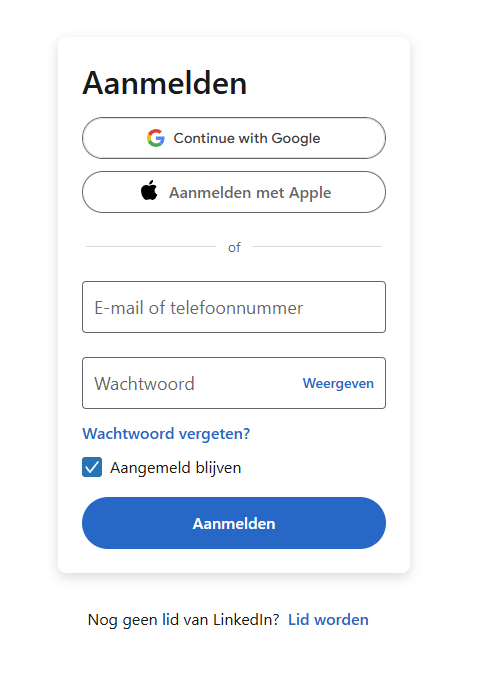
Start by signing in to your LinkedIn account
2. Navigate to Your Profile
Click on your profile picture or the "Me" icon in the top navigation bar, then select "View Profile" from the dropdown menu.
3. Find the "Resources" Button
On your profile page, locate the "Resources" button just below your profile header (near your name and headline). If you don't see it immediately, look for a "More" button, on some account types the option sits there instead.
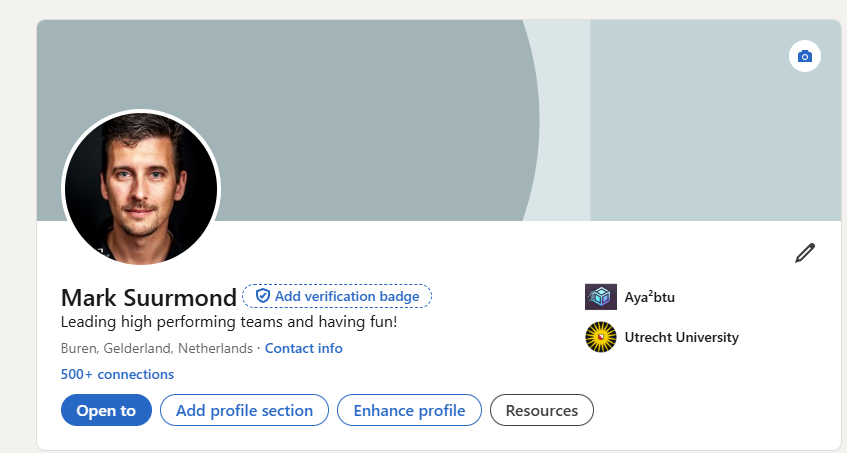
Look for the 'Resources' button in your profile header
4. Select "Save to PDF"
Click "Resources" (or "More"). A dropdown will appear, select "Save to PDF".
5. Download the PDF
Your browser starts downloading the file automatically. It will be named something like Profile.pdf. Check your Downloads folder if it doesn't open right away.
How to Export Your LinkedIn Profile to PDF on Mobile (2026)
The mobile app works slightly differently:
- Open the LinkedIn app and tap your profile photo in the top-left corner
- Tap "View Profile"
- Tap the three dots (⋯) in the top-right corner of your profile
- Select "Save to PDF" from the menu
- The PDF will be saved to your phone's Files or Downloads folder
Note: On some mobile devices the export opens as a print preview. Tap "Save as PDF" in your print options to save it to your device.
How to Save Your LinkedIn Profile as a PDF (2026)
"Saving" and "exporting" your LinkedIn profile are the same thing, LinkedIn calls the button "Save to PDF". Follow the desktop or mobile steps above and your profile will be saved as a PDF to your Downloads folder automatically.
How to Download Your LinkedIn Profile as a PDF (2026)
"Downloading" your LinkedIn profile as a PDF works the same way as exporting it. On desktop, go to your profile Resources Save to PDF. On mobile, tap the three dots on your profile Save to PDF. The file downloads to your device immediately.
How to Print Your LinkedIn Profile (2026)
LinkedIn has no dedicated "Print" button, so printing takes two steps. First save your profile as a PDF using the steps above (Resources Save to PDF on desktop, or the three dots ⋯ Save to PDF on mobile). Then open that Profile.pdf and print it like any other file, which gives you the cleanest layout. If you'd rather skip the PDF, press Ctrl + P (Windows) or Cmd + P (Mac) while viewing your own profile in a browser and print straight from there, though the page also captures the LinkedIn navigation around your profile.
LinkedIn's PDF is a useful starting point, but it's not a finished resume. Use Aycabtu to turn it into an ATS-optimised resume tailored to a specific job, no manual typing required.
What's Included in the LinkedIn PDF?
The PDF generated by LinkedIn includes most of the core sections of your profile:
Your headline and summary
Work experience with descriptions
Education details and dates
Skills listing your expertise
Recommendations (received and given)
Accomplishments including:
- Publications
- Patents
- Courses
- Projects
- Honors & awards
- Test scores
- Languages
It generally doesn't include your profile photo, connections, or activity feed. The formatting is basic but provides a comprehensive text-based overview of your career history. This is enough information for Aycabtu to start with.
You can add a photo later if you want to include it in your resume. Aycabtu will also allow you to add a custom header and footer to your resume, so you can personalize it further.
If you also have a resume or personality tests, you can upload that as well. Aycabtu will intelligently combine the information from both documents to create a more tailored resume.
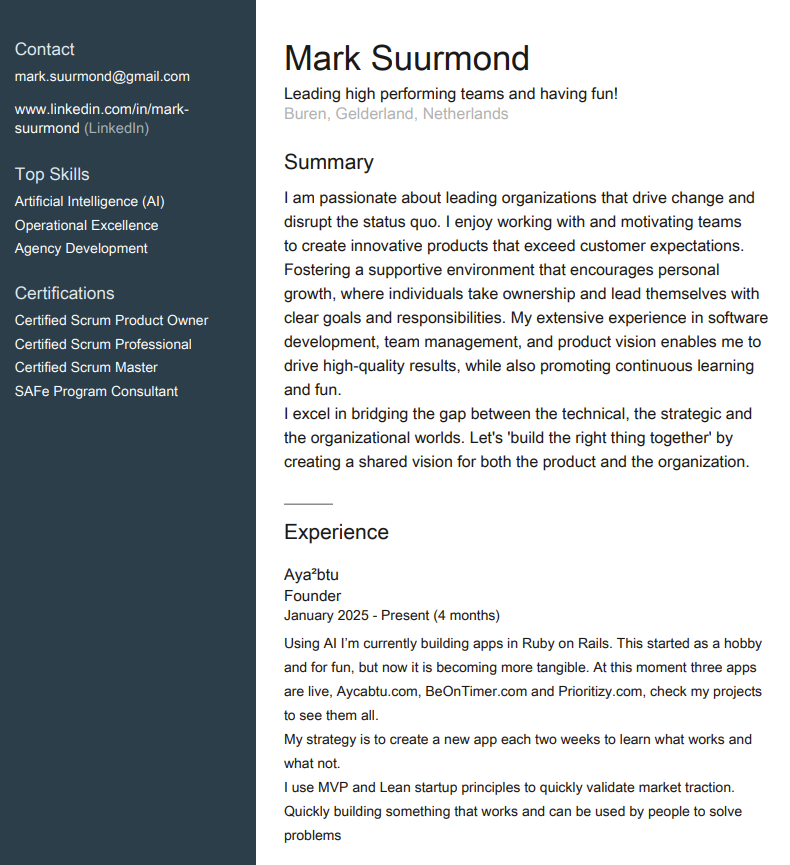
Your LinkedIn PDF contains all the essential elements of your professional history
What's next? Read our dedicated guide: You've Exported Your LinkedIn PDF, Now What? (Turn It Into a Real Resume)
Using the PDF with Aycabtu
Once you have downloaded your LinkedIn profile PDF, you can easily use it with Aycabtu to create a tailored resume:
Go to the Aycabtu Documents page:
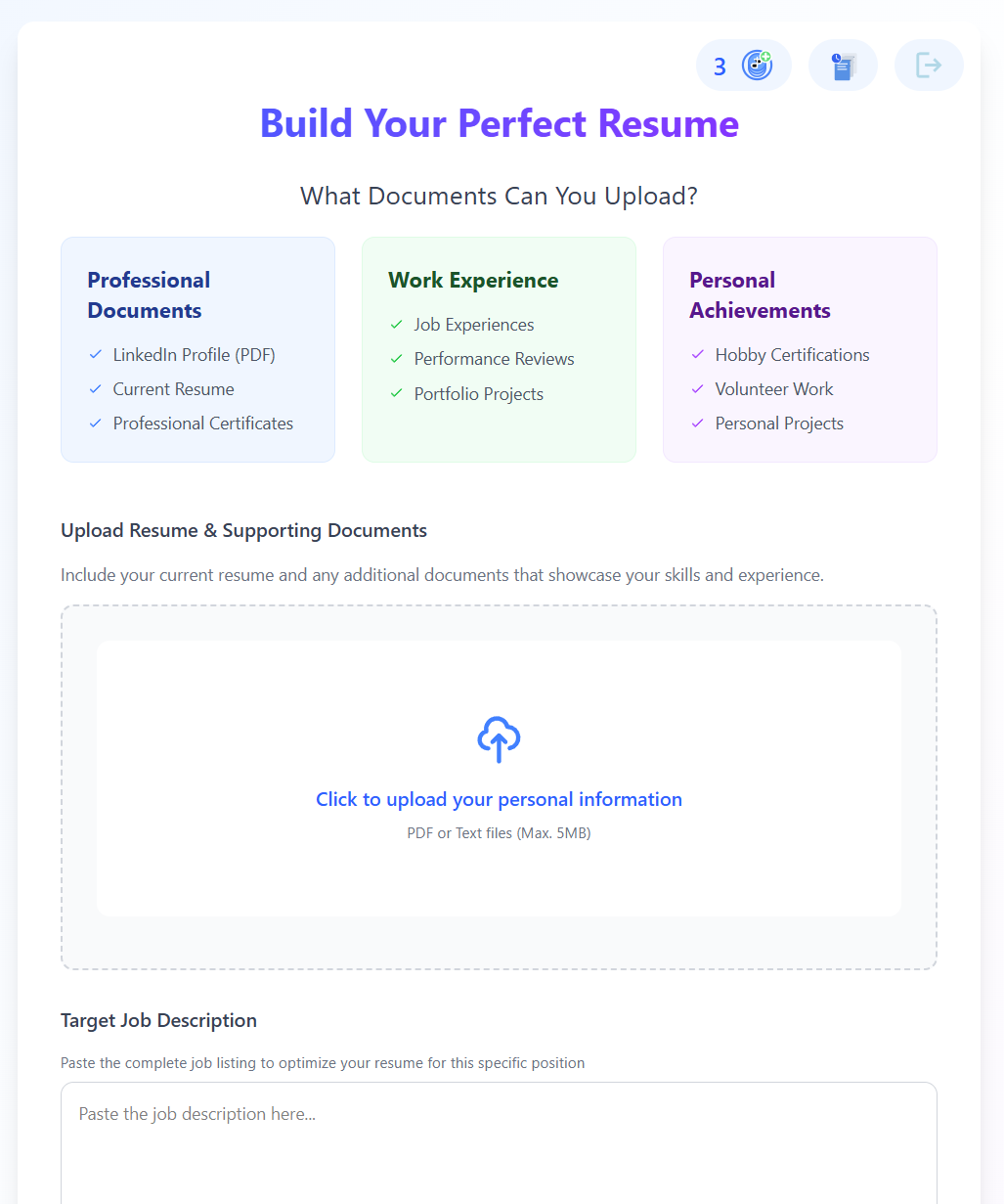
Under the "Upload Resume & Supporting Documents" section, click the upload area or drag and drop your Profile.pdf file.
Paste the target job description you're applying for:
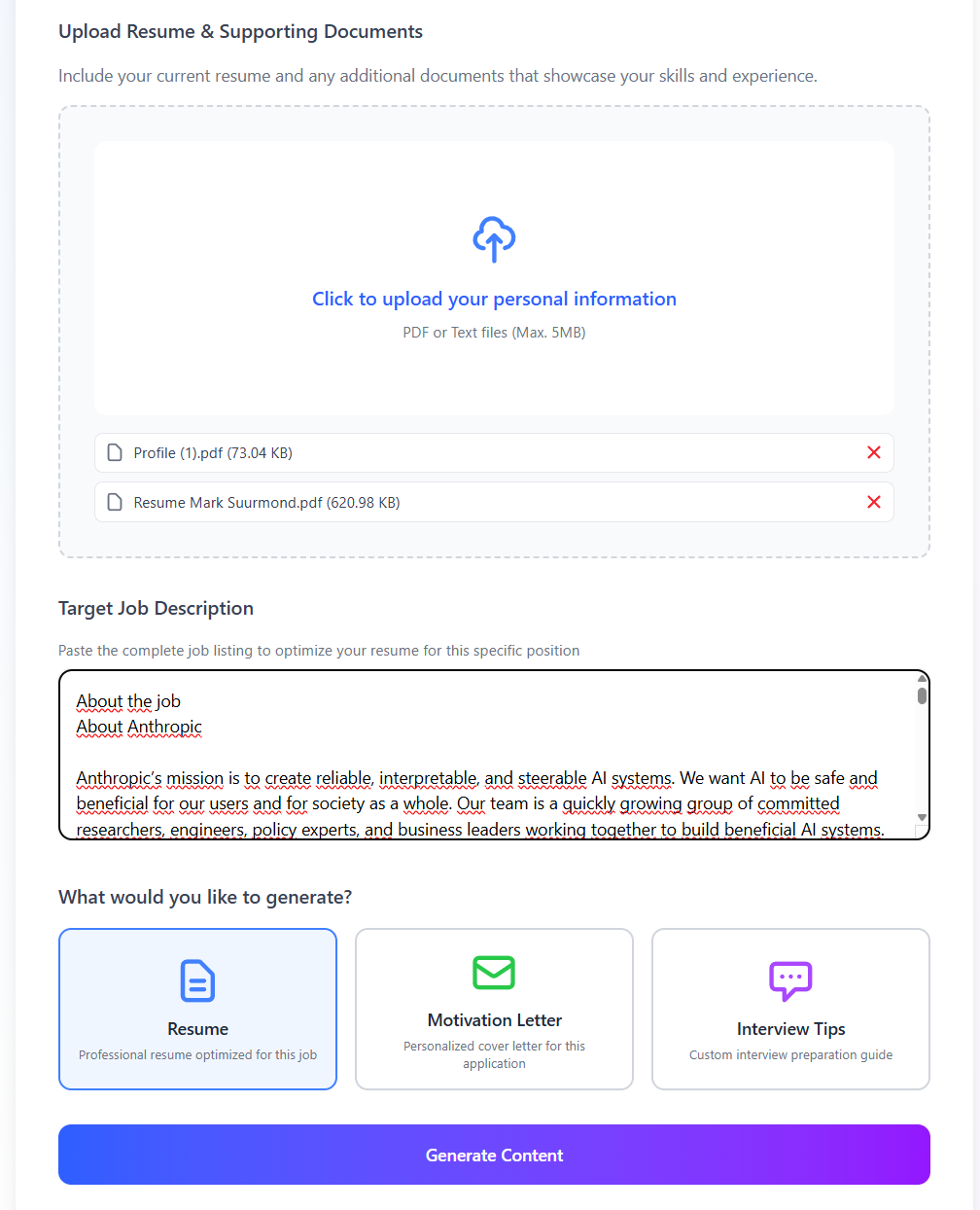
Select "Resume" as the generation type.
Click "Generate Content".
Aycabtu's AI will analyze the content from your LinkedIn PDF and the job description to create a new, optimized resume tailored for that specific role, while aiming to preserve your unique professional voice.
PDF generation
After your resume is generated, Aycabtu structures it into three distinct pages:
- Page 1: Personal Story & Added Value: This page focuses on your unique narrative, professional summary, and the specific value you bring.
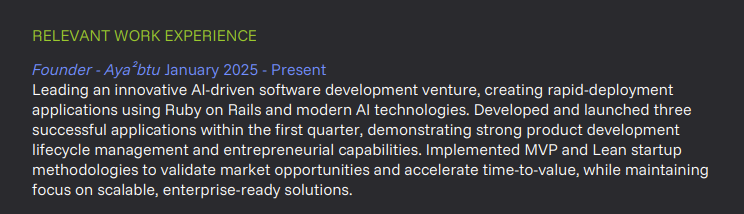
- Page 2: Work Experience: Details your professional history, roles, responsibilities, and key achievements.
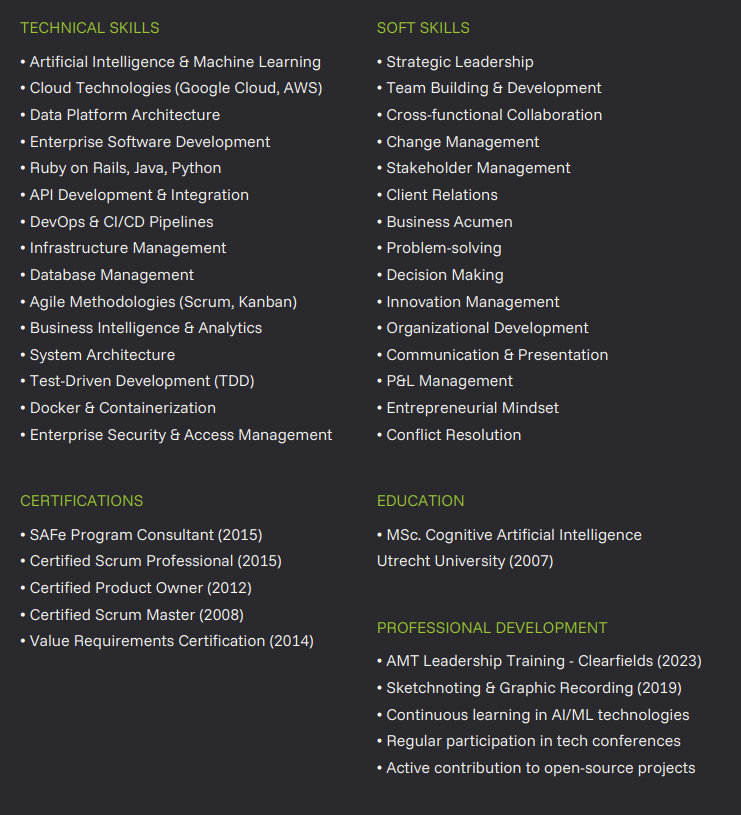
- Page 3: Soft & Tech Skills: Highlights your technical proficiencies and essential soft skills relevant to the target role.
You can then edit the text on each page and save it. Once finalized, you can download the complete 3-page resume as a PDF. This is a great way to share your comprehensive profile with potential employers or keep a copy for your records.
Edit and customize the generated text to fit your style and preferences.
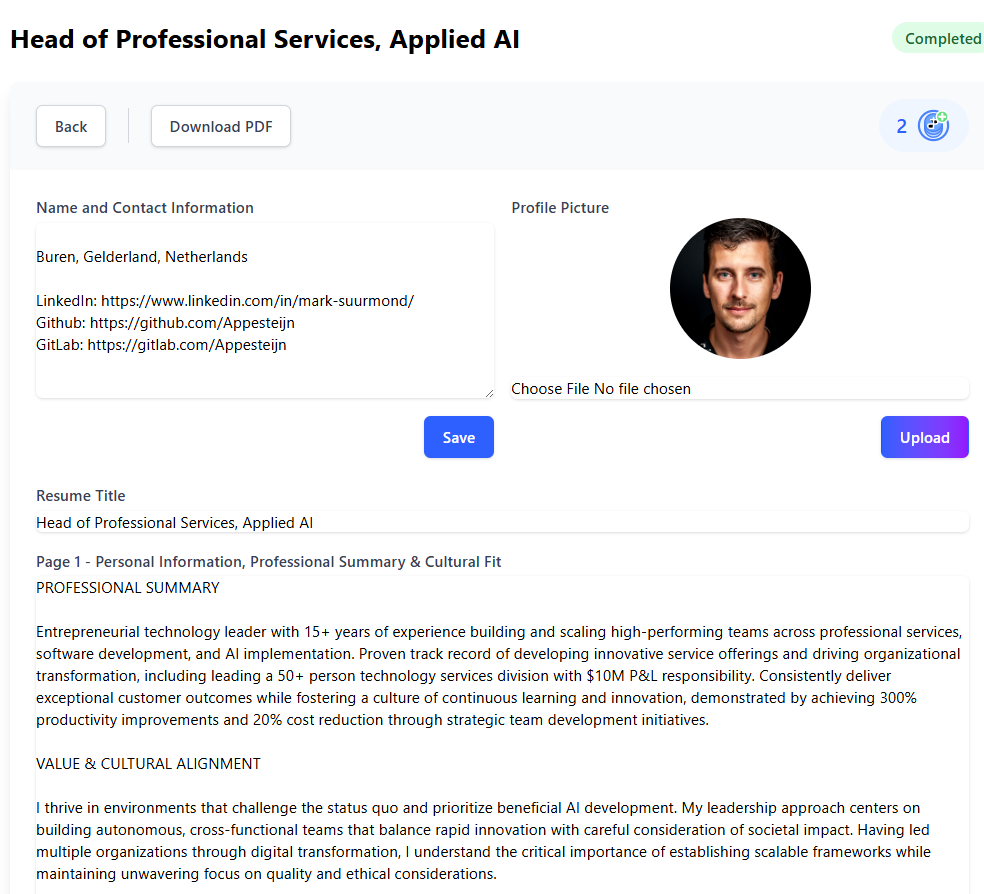
Then export it as a PDF to share with potential employers.
Here's a preview of how the pages might look:
Page 1: Personal Story & Value

Page 2: Work Experience
Page 3: Skills
Frequently Asked Questions
How to export LinkedIn profile to PDF in 2026?
On desktop in 2026, log in to LinkedIn, open your profile, click Resources (or More on some accounts), then choose Save to PDF. On the mobile app, tap your profile photo, then View Profile, then the three dots ⋯, then Save to PDF. The PDF downloads to your device in about ten seconds.
How to download LinkedIn profile as PDF in 2026?
Downloading and exporting are the same action on LinkedIn in 2026. Go to your own profile on desktop, click Resources Save to PDF, and the file is saved to your Downloads folder. On mobile, use the three dots ⋯ on your profile and pick Save to PDF. The file is named Profile.pdf by default.
How to save LinkedIn profile as PDF in 2026?
LinkedIn calls the button "Save to PDF" in 2026, so "save", "download" and "export" all use the same option. Open your own profile, click Resources on desktop or the three dots ⋯ on mobile, then Save to PDF. If you don't see "Resources", look for "More", because LinkedIn shows the option under one or the other depending on your account type.
How do I print my LinkedIn profile in 2026?
LinkedIn has no direct print option, so save your profile as a PDF first (Resources Save to PDF on desktop, the three dots ⋯ Save to PDF on mobile), then print that file for the cleanest result. Alternatively, press Ctrl + P or Cmd + P while viewing your own profile in a browser to print the page directly.
I can't find the "Save to PDF" button. Where did it go?
LinkedIn occasionally redesigns its interface. If you don't see a "Resources" button, look for a "More" button (three dots or the word "More") on your profile page, the export option is usually there. On mobile, tap the three dots in the top-right corner of your own profile page.
Can I download someone else's LinkedIn profile as a PDF?
No. The "Save to PDF" option only works on your own profile. You cannot export another person's profile directly from LinkedIn.
Is the LinkedIn PDF a good resume I can send directly to employers?
Not really. The LinkedIn PDF uses LinkedIn's fixed layout, it has no customisation, no keyword targeting for a specific job, and the formatting rarely matches what recruiters expect. It's best used as raw material to feed into a resume builder like Aycabtu, which generates a properly formatted, ATS-optimised resume tailored to the specific job you're applying for.
How do I download my LinkedIn profile as a PDF?
Go to your LinkedIn profile on desktop, click Resources (or More), then select Save to PDF. On mobile, tap the three dots in the top-right corner of your own profile and choose Save to PDF. The file downloads to your device instantly.
What if the PDF download doesn't start?
Check that your browser isn't blocking pop-ups or downloads from linkedin.com. Try a different browser if the issue persists. On mobile, you may need to allow LinkedIn to access your phone's storage.
How often should I update my LinkedIn PDF?
Whenever your profile changes significantly, new role, new skills, completed a course. If you're using the PDF to generate resumes with Aycabtu, re-export it and re-upload whenever you want your most current information included.
Related reading: What is ATS and how does it affect your resume? · Resume Writing Best Practices for 2026 · The Complete Job Application Guide: From Resume to Offer · How to Prepare for a Job Interview · How to Research Your Interviewers Before a Job Interview
Try it
You've just exported your LinkedIn PDF. See how it scores against a real job in seconds: your ATS score, missing keywords, and concrete tips. Free, no signup.
Check my ATS score → Or generate a full tailored resume (free account) →How does your LinkedIn resume score on ATS?
You've just exported your LinkedIn PDF. See how it scores against a real job in seconds: your ATS score, missing keywords, and concrete tips. Free, no signup.
Check my resume for free Or generate a full tailored resume (free account) →